A manifestation app is a phone or web tool that helps you name a wish and come back to it, through affirmations, visualization, journaling, vision boards or reminders. MurMur is a manifestation app built around one wish at a time and one small step; it’s in free private beta, and you can click through the prototype today.
What a manifestation app does, and what it can’t do
Strip away the branding and most apps do some mix of four jobs: a sentence to repeat, a scene to picture, a place to write, and a nudge to come back tomorrow. That last job matters more than it sounds, because a wish you wrote down in January is easy to lose under a few weeks of email and laundry.
What no app can do is make the outcome happen or pick its timing. It can’t stand in for a doctor, a therapist or a financial adviser either, and if an app’s copy hints that it can, read the rest of the listing slowly. Our guide Is manifestation real? goes through what the psychology studies found, including the uncomfortable finding that, in one set of studies, positive fantasies predicted less effort. One approach with research behind it pairs the wish with an honest look at the obstacle and a plan, which we cover in mental contrasting vs manifestation.
How to choose the best manifestation app: six questions
When we searched for the best manifestation app in October 2026, most of the lists near the top were written by app makers about their own apps. We make an app too, so instead of a ranking, here are the questions we’d ask of any app, ours included.
- Where do my words go?Wishes are private: a relationship, a body, money, a job you haven’t told your boss you want to leave. On the App Store, scroll to “App Privacy” to see what the developer says it collects and what it uses to track you. Then check whether you can export and delete your data.
- Does it promise outcomes?“Manifest anything” is a slogan. A listing that frames the app as a ritual or a reminder is making a claim it can keep.
- Does it still work on a day you don’t believe?Look for a way to soften an affirmation instead of forcing one you can’t say with a straight face.
- What happens when you miss a day?Streak counters suit some people. For others they turn a gentle habit into a scoreboard, which is a short walk from toxic positivity.
- Does it keep what you imagined apart from what happened?A journal that mixes the two makes confirmation bias very easy.
- Does it respect other people?If you’re focused on a specific person, an app should leave their choices to them.
Types of manifestation apps, with real examples
If you’re comparing the best manifestation apps of 2026, sort them by what they ask you to do; many mix types. Each example comes from the app’s own listing or website, opened on October 12, 2026, and we report what it says, not how well it works. Nearly every App Store listing we opened reads “Free” with in-app purchases, so a free download says little about what you’ll pay.
| Type | Good at | Ask before you rely on it |
|---|---|---|
| Affirmation | Lots of small touchpoints a day for almost no effort | Can I edit or soften the lines? |
| Vision board | One picture you see every day | Does it lead to anything I’ll do this week? |
| Journal | Thinking on the page, and a record to look back on | Where are entries stored, and can I lock them? |
| AI companion or audio | Practice that feels made for you | What happens to my wish text and my voice? |
Affirmation apps
I am - Daily Affirmations by Monkey Taps puts an affirmation on your Lock Screen and Home Screen widgets and lets you schedule reminders through the day. Its App Store privacy label, as filled in by the developer, lists user content and identifiers under data that may be used to track you. ThinkUp takes a different route: you record affirmations in your own voice and play them over music.
Vision board apps
Vision Board Maker・Dreamer asks you to collect images and intentions that inspire you; its version history notes added AI image generation. A vision board keeps one picture in front of you but rarely becomes a Tuesday plan, so our 2027 vision board guide pairs every goal with one small step.
Manifestation journal apps
Gratitude: Self-Care Journal sends reminders with prompts, lets you add photos or record entries in your voice, and folds in affirmations and a vision board. It suits people who work out what they want by writing. For starting points, borrow our manifestation journal prompts.
Digital manifestation journal vs paper
Paper is private by default, but you can’t search it and you can lose it. A digital manifestation journal is searchable and asks you to trust a company. Day One, a general journaling app, shows what earning that trust looks like: its homepage lists passcode and biometric locks, end-to-end encryption and automatic backups. Prefer paper? Our manifestation journal examples include setups you can copy into a notebook.
AI companions and personalized audio
Stella - Manifest Anything offers personalized audio narratives and says each affirmation and audio piece is generated for you from your goals. Aya: Manifest Your Dream Self plays affirmations spoken by your “dream self”, and its version history adds voice cloning so you can hear a manifestation in your own voice. Before you upload your voice anywhere, read how it’s stored. MurMur, an AI manifestation companion, belongs in this group as an idea, though its prototype doesn’t run live AI yet.
How MurMur works: a guided manifestation journal, in prototype
Everything here comes from the public prototype. It is a prototype, the app is being built, and some screens are labelled as demos.
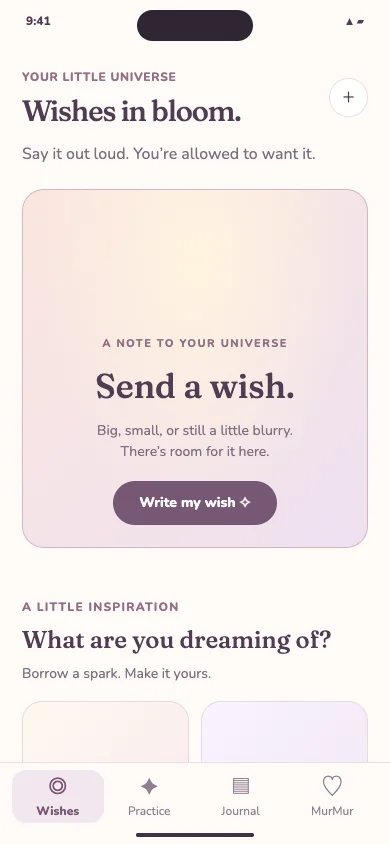
- Write the wish as an order.You fill in “I want…” and “I want to feel…”, then get a wish receipt to download as a PNG. Its small print reads “An intention to hold, not an outcome promised.”
- Read the note of the day.One gentle line that changes daily, such as “I can feel unsure and still give myself a chance.”
- Practice in three steps.Describe an ordinary morning in the life you want. Rewrite a starter affirmation and hear your device’s voice read it, with a “Make it gentler” button for doubtful days. Then name one step and what you’ll do if it feels difficult. That wish, obstacle and plan shape is close to WOOP.
- Pause with a guided meditation.One to fifteen minutes, with soft synthesized tones and optional spoken guidance.
- Make a vision board.Pick stickers, a caption and a palette, and the prototype renders an image you can download as a phone wallpaper. It’s labelled a demo collage; AI image generation isn’t connected.
- Keep an honest record.A practice recap saves your imagined scene and planned step as an intention, and the prototype says plainly that it “does not mark your action as completed.” Feelings and gratitude get their own entries.
You can edit or forget anything on MurMur’s short memory list. Reminders are a saved preference only; the prototype sends no notifications. The growth meter says “No streaks to lose,” and the chat screen is labelled “Scripted replies, not live AI”.
Against the six questions: prototype wishes stay in your browser, with export and clear buttons, and no inbox or calendar is connected. The gaps are real too: no native app yet, no live AI, and no reminders that arrive.
Is MurMur a free manifestation app? The beta, platforms and your data
- Price. MurMur is in private beta, and the beta is free. MurMur may charge in the future; no prices have been announced.
- Platforms. MurMur is being built for iOS, Android, the web and messaging apps. Today there is a web prototype.
- AI training. Your data is not used to train AI models.
- Beta form. What you send in the beta application is stored in a private Vercel Blob store, Vercel’s storage service.
- App data. Where app data will be stored, and for how long, isn’t decided yet. We will publish it in a privacy policy before launch rather than guess at it here.
Questions about manifestation apps
Do manifestation apps actually work?
They can help you keep a wish in view and remember to take a step. No app can guarantee an outcome or its timing, and one that says it can is selling the wrong thing.
What app can I use to record daily affirmations?
ThinkUp’s App Store listing is built around recording affirmations in your own voice, and Gratitude: Self-Care Journal lets you record your voice to affirmations you write. The MurMur prototype reads your affirmation with your device’s voice and doesn’t record you.
Is there a free manifestation app?
Many are free to download, with in-app purchases, so check what sits behind the paywall. MurMur’s private beta is free. MurMur may charge in the future, and no prices have been announced.
Is MurMur on iPhone or Android?
Not yet. MurMur is being built for iOS, Android, the web, and messaging apps. Today you can click through a web prototype, and you can apply for the private beta from the homepage.
Does MurMur use AI?
MurMur is being built as an AI companion, but the public prototype runs no live AI: the chat is scripted, the vision board is a sticker collage, and the planning help is a template. Your data is not used to train AI models.
Unsure of a word? Try the manifestation glossary.